
Encrypted Token
This guide explains how to process payments using an encrypted Apple Pay payload. This is the recommended approach for most merchants as it simplifies integration and provides enhanced security by keeping the sensitive payment data encrypted throughout the payment flow.
Why Use Encrypted Tokens?
The encrypted token method offers several advantages:
- Enhanced security: The payment data remains encrypted from Apple’s servers to the payment gateway
- Simplified PCI compliance: Reduces PCI DSS scope as your systems never handle unencrypted card details
- Streamlined integration: Eliminates the need to implement complex decryption logic
- Reduced liability: Minimizes exposure to sensitive payment data
- Future compatibility: Ensures compatibility with Apple’s security updates and enhancements
Prerequisites
- Complete the Apple Pay account setup
- Implement Apple Pay in your client application following Apple’s guidelines
- Ensure your payment gateway supports Apple Pay encrypted token processing
Implementation Process
- Configure your client application to collect Apple Pay payments
- When a user completes an Apple Pay transaction, receive the encrypted payload
- Pass the entire encrypted token without modification to your backend
- Construct a standard Sale/Auth request that includes the encrypted Apple Pay token
- Set the payment
paymentMethodtoAPPLE_PAY_TOKEN - Submit the payment request to the payment gateway
Tokens and request examples
Encrypted Apple Token
The encrypted Apple Pay token includes payment details encrypted by Apple and is structured as follows:
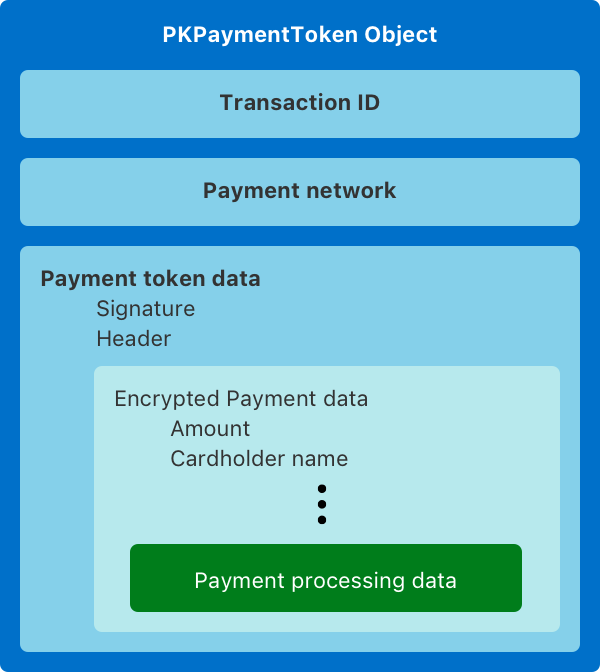
{ "paymentData": { "data": "V7OcjttPJnUJaQH7x7OjbIeZSINuc...pm+2RquBArCp71Z9CPSGwQ6bfcq09Dwsw3WJ0RGg=", "signature": "MIAGCSqGSIb3DQEHAqCAM...xCzAJBgNVBAY3Sbrb7MpYRdEAAAAAAAA=", "header": { "publicKeyHash": "L6vppo38t31Q/9npxRy/xbA1+cs13h1LV+pMO/FYwvo=", "ephemeralPublicKey": "MFkwEwYHKoZI...sum3onbZcAU/4Q==", "transactionId": "4f4fac7a1...a6a8ba2c0e8c5" }, "version": "EC_v1" }, "paymentMethod": { "displayName": "MasterCard 1111", "network": "MasterCard", "type": "credit" }, "transactionIdentifier": "4F4FAC7A10474...8BA2C0E8C5"}Example how to get it from browser:
session.onpaymentauthorized = async (event: ApplePayJS.ApplePayPaymentAuthorizedEvent) => { ... const applePayToken = JSON.stringify(event.payment.token); ...}Sale/Auth example
When submitting a payment using an encrypted Apple Pay token, your request should look like this:
{ "order": { "orderMerchantId": "123", "orderDescription": "Order description", "orderAmount": "10.00", "orderCurrencyCode": "EUR" }, "browser": { "ipAddress": "123.123.123.123" }, "card": { "cardNumber": "4444444411111111", "expireMonth": "12", "expireYear": "2028" }, "paymentMethod" : "APPLE_PAY_TOKEN", "applePayToken" : "{\"paymentData\":{\"data\":\"dvKmMHpogc/dmVtTyqNN ... b5vlerWL8=\",\"signature\":\"MIAGCSq ... o7MALywDDAAAAAAAAA==\",\"header\":{\"publicKeyHash\":\"vPhCD8VZijln1 ... XTlLS2kbwvtF44Qc=\",\"ephemeralPublicKey\":\"MFkwEwYHKoZIzj0CAQYI ... 34QClQdmA5fxV8VkQ==\",\"transactionId\":\"697620c044f97cadfdd ... a07f5a5823c8146265177c0\"},\"version\":\"EC_v1\"},\"paymentMethod\":{\"displayName\":\"MasterCard 1111\",\"network\":\"MasterCard\",\"type\":\"debit\"},\"transactionIdentifier\":\"697620c044f97cadfdd38d ... 5a5823c8146265177c0\"}"}Important: The
applePayTokenfield must contain the entire Apple Pay token as a JSON string. Do not modify the token in any way before sending it to the payment gateway.
Best Practices
- Error Handling: Implement robust error handling to manage cases where Apple Pay transactions fail
- Testing: Use Apple’s sandbox environment for testing before going to production
- Logging: Log transaction references but avoid logging the full encrypted token
- Versioning: Be aware of the Apple Pay API version you’re using and stay updated with changes
- User Experience: Provide clear feedback to users about the payment status
Troubleshooting
Common issues when working with encrypted Apple Pay tokens:
| Issue | Possible Cause | Solution |
|---|---|---|
| Invalid token error | Token formatting issues | Ensure the token is passed as a proper JSON string |
| Session timeout | User took too long to complete payment | Implement timeouts and user notifications |
| Unsupported card | Card not supported by your payment processor | Check payment processor documentation for supported card types |
| Validation errors | Missing required fields in your request | Verify all required fields are included in your request |
For additional support or questions about implementing Apple Pay with encrypted tokens, please contact our technical support team.
Comparing Encrypted vs. Decrypted Methods
| Feature | Encrypted Method | Decrypted Method |
|---|---|---|
| Security | Higher - data always encrypted | Lower - decrypted data in your systems |
| Implementation Complexity | Lower - simplified integration | Higher - requires decryption implementation |
| PCI DSS Scope | Minimal | Expanded |
| Control over data | Limited | More extensive |
| Recommended for | Most merchants | Special use cases only |
See the ApplePay Decrypted Token guide for information on the decrypted token approach.