
Decrypted Token
This guide describes how to create a payment using a decrypted Apple Pay payload. Use this process when you need to decrypt the Apple Pay payload with your own keys before sending payment information to the payment gateway.
Why Use Decrypted Tokens?
Using decrypted tokens offers several advantages:
- Enhanced control: Manage the payment data processing flow according to your specific business requirements
- Custom integration: Seamlessly integrate with existing payment systems that require raw card data
- Advanced fraud detection: Apply custom fraud detection rules before submitting the payment
- Compliance: Meet specific regulatory requirements in certain jurisdictions
Prerequisites
-
Obtain the necessary Apple Pay certificates for decryption
-
Implement decryption logic in your backend using Apple’s cryptographic specifications
Implementation Process
- Receive the encrypted Apple Pay payload from your client application
- Decrypt the payload using your private keys and certificates
- Extract the necessary payment information according to the mapping table below
- Construct a standard Sale/Auth request using the extracted data
- Submit the Sale/Auth request to the payment gateway
Data Mapping Table
The table below shows how to map fields from the decrypted Apple Pay token to the corresponding fields in the Sale/Auth request:
| # | ApplePay Decrypted token (details.decrypted_data) | Sale/Auth Request | Note | Example |
|---|---|---|---|---|
| 1 | applicationPrimaryAccountNumber | card.cardNumber | 5555444433331111 | |
| 2 | applicationExpirationDate | card.expireYear | ’20’ plus first 2 chars | 2028 |
| 3 | applicationExpirationDate | card.expireMonth | 3 and 4 chars | 12 |
| 4 | paymentData.onlinePaymentCryptogram | threeDSResultInfo.authenticationValue | AnZPt6sADBgtrkkC1XlvMAACAAA= | |
| 5 | paymentData.eciIndicator | threeDSResultInfo.eci | ’0’ plus eciIndicator | 07 |
Tokens and request examples
Encrypted Apple Token
The encrypted Apple Pay token includes payment details encrypted by Apple and is structured as follows:
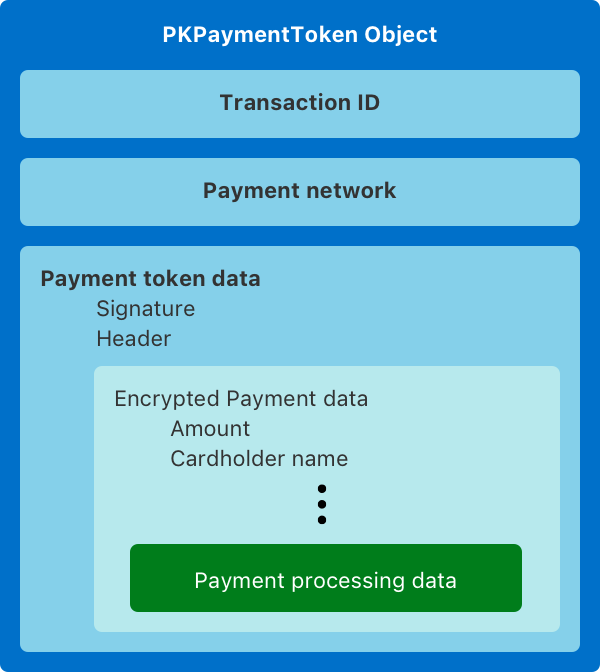
{ "paymentData": { "data": "V7OcjttPJnUJaQH7x7OjbIeZSINuc...pm+2RquBArCp71Z9CPSGwQ6bfcq09Dwsw3WJ0RGg=", "signature": "MIAGCSqGSIb3DQEHAqCAM...xCzAJBgNVBAY3Sbrb7MpYRdEAAAAAAAA=", "header": { "publicKeyHash": "L6vppo38t31Q/9npxRy/xbA1+cs13h1LV+pMO/FYwvo=", "ephemeralPublicKey": "MFkwEwYHKoZI...sum3onbZcAU/4Q==", "transactionId": "4f4fac7a1...a6a8ba2c0e8c5" }, "version": "EC_v1" }, "paymentMethod": { "displayName": "MasterCard 1111", "network": "MasterCard", "type": "credit" }, "transactionIdentifier": "4F4FAC7A10474...8BA2C0E8C5"}Example how to get it from browser:
session.onpaymentauthorized = async (event: ApplePayJS.ApplePayPaymentAuthorizedEvent) => { ... const applePayToken = JSON.stringify(event.payment.token); ...}Decrypted Apple Token
This is what you’ll see after successfully decrypting the Apple Pay payload:
{ "details": { "decrypted_data": { "applicationPrimaryAccountNumber": "5555444433331111", "applicationExpirationDate": "281231", "currencyCode": "978", "transactionAmount": 1000, "deviceManufacturerIdentifier": "040010030273", "paymentDataType": "3DSecure", "paymentData": { "onlinePaymentCryptogram": "AnZPt6sADBgtrkkC1XlvMAACAAA=", "eciIndicator": "7" } }, "brand_data": { "displayName": "MasterCard 1111", "network": "MasterCard", "type": "credit" } }}Sale/Auth example
After extracting the necessary fields from the decrypted token, your final Sale/Auth request should look like:
{ "order": { "orderMerchantId": "123", "orderDescription": "Order description", "orderAmount": "10.00", "orderCurrencyCode": "EUR" }, "browser": { "ipAddress": "123.123.123.123" }, "card": { "cardNumber": "4444444411111111", "expireMonth": "12", "expireYear": "2028" }, "threeDSResultInfo": { "authenticationValue": "AnZPt6sADBgtrkkC1XlvMAACAAA=", "eci": "07" }}Troubleshooting
Common issues you might encounter when working with decrypted Apple Pay tokens:
- Decryption failures: Ensure you’re using the correct merchant certificate and private key
- Missing fields: Verify all required fields are extracted from the decrypted payload
- Format issues: Check the format of expiration date and ECI values in your requests
- Authentication errors: Ensure the cryptogram is correctly passed to the authentication value field